

UObject, but it also introduces several nuances related to the internal behavior of the system.Introduction#
Technically, UObject replication is called Sub-Object Replication. A UObject cannot replicate on its own — it can only be replicated as part of an AActor, similar to a component that cannot exist independently. In previous articles, we already used this mechanism with systems like UAbilitySystemComponent and UHealthAttribute. Now, let’s take a look at how to replicate our own custom UObject.
All experiments in this article are performed in Unreal Engine 5.7.0, where Iris has moved from Experimental to Beta status.
Sub-Object Replication#
Here we’ll go through how to replicate a UObject using Iris and the new SubObjectReplicationList mechanism. Previously, the workflow was different: AActor and UActorComponent had a ReplicateSubobjects method that you needed to override, manually calling Channel->ReplicateSubobject(MySubobject, *Bunch, *RepFlags);. You can read more about the old and new approaches in the official documentation.
To replicate a UObject, you need to perform a few steps:
- Enable ObjectReplicationList in DefaultEngine.ini. As far as I understand, this forces all actors and components to use the new mechanism. This option is required when using Iris.
- Override
IsSupportedForNetworking(). - Just like with any
AActororUActorComponent, overridevoid GetLifetimeReplicatedProps(TArray<FLifetimeProperty>& OutLifetimeProps) const. - Use the following methods to add or remove sub-objects from the replication list:
UActorComponent::AddReplicatedSubObject,UActorComponent::RemoveReplicatedSubObject,AActor::AddReplicatedSubObject, andAActor::RemoveReplicatedSubObject.
UObject must point to the Actor or Component that owns this object.[SystemSettings]
net.SubObjects.DefaultUseSubObjectReplicationList=1
UCLASS()
class UMyObject : public UObject
{
	// ...

	bool IsSupportedForNetworking() const override { return true; }

	UPROPERTY(Replicated)
	int32 MyRepValue;
}

void UMyObject::GetLifetimeReplicatedProps(TArray<FLifetimeProperty>& OutLifetimeProps) const
{
	Super::GetLifetimeReplicatedProps(OutLifetimeProps);

	FDoRepLifetimeParams Params;
	Params.bIsPushBased = true;

	Params.Condition = COND_None;
	DOREPLIFETIME_WITH_PARAMS_FAST(UMyObject, MyRepValue, Params);
}
An example of a Component that replicates its own UObject sub-objects — such as an inventory.
UCLASS()
class UMyActorComponent : public UActorComponent
{
	// ...

	void Add(UMyObject* Object)
	{
		MyObjects.Add(Object);

		AddReplicatedSubObject(Object);
	}

    UPROPERTY(Replicated)
	TArray<TObjectPtr<UMyObject>> MyObjects;

	// Don’t forget to override this method
	void GetLifetimeReplicatedProps(TArray<FLifetimeProperty>& OutLifetimeProps) const override;
}
And here, the Actor replicates its UObject sub-objects directly.
UCLASS()
class UMyActor : public AActor
{
	// ...

	void Add(UMyObject* Object)
	{
		MyObjects.Add(Object);

		AddReplicatedSubObject(Object);
	}

	UPROPERTY(Replicated)
	TArray<TObjectPtr<UMyObject>> MyObjects;

	// Don’t forget to override this method
	void GetLifetimeReplicatedProps(TArray<FLifetimeProperty>& OutLifetimeProps) const override;
}
An example of properly creating a UMyObject with the correct Outer assigned.
void CreateMyObject(UMyActor* Actor)
{
	// Actor MUST be outer of Instance
	auto Instance = NewObject<UMyObject>(Actor);
	Actor->Add(Instance);
}

void CreateMyObject(UMyActorComponent* Component)
{
	// or Component MUST be outer of Instance
	auto Instance = NewObject<UMyObject>(Component);
	Component->Add(Instance);
}
In the Iris source code, I’ve seen that in some cases GetTransientPackage() may also serve as an Outer. I haven’t tested this myself, so it might be a misunderstanding on my part or some internal, engine-specific use case.
The documentation also states that you are required to override RegisterReplicationFragments.
You must implement RegisterReplicationFragments for any object interfacing with the Iris replication system. Any class inherited from AActor implements this function automatically, but any object not inherited from AActor must manually implement this function.
void UMyObject::RegisterReplicationFragments(UE::Net::FFragmentRegistrationContext& Context, UE::Net::EFragmentRegistrationFlags RegistrationFlags)
{
	// Build descriptors and allocate PropertyReplicaitonFragments for this object
	UE::Net::FReplicationFragmentUtil::CreateAndRegisterFragmentsForObject(this, Context, RegistrationFlags);
}
This is not strictly required — CreateAndRegisterFragmentsForObject will still be called automatically if the Context is not registered.
// Somewhere inside Iris
void CallRegisterReplicationFragments(UObject* Object, FFragmentRegistrationContext& Context, EFragmentRegistrationFlags RegistrationFlags)
{
	// Try the user implementation first
	Object->RegisterReplicationFragments(Context, RegistrationFlags);

	// If no user implementations exist, create fragments automatically
	if (!Context.WasRegistered())
	{
		FReplicationFragmentUtil::CreateAndRegisterFragmentsForObject(Object, Context, RegistrationFlags);
		ensure(Context.WasRegistered());
	}
}
MaxReplicatedObjectCount#
In Iris, there is a limit on the maximum number of replicated objects. This includes any replication-aware object that receives its own NetId: every replicated AActor, UActorComponent, and UObject gets a unique NetId.
For example, imagine we have 3 replicated actors, each with 3 replicated components, and each component contains 3 replicated UObject sub-objects.
In total, this gives us:
3 × 3 × 3 = 27 replicated objects.
If the total number of replicated objects exceeds MaxReplicatedObjectCount, the game or server will crash with an error like this:
NetRefHandleManager: Hit the maximum limit of active replicated objects: 65536. Aborting since we cannot replicate MyObject_C
// Try to grow the NetObjectLists if no more indexes are available.
if (InternalIndex == InvalidInternalIndex)
{
	InternalIndex = GrowNetObjectLists();

	// If we could not grow anymore, kill the process now. The system cannot replicate objects anymore and the game behavior is undefined.
	if (InternalIndex == InvalidInternalIndex)
	{
		UE_LOG(LogIris, Fatal, TEXT("NetRefHandleManager: Hit the maximum limit of active replicated objects: %u. Aborting since we cannot replicate %s"), MaxActiveObjectCount, Params.ReplicationProtocol->DebugName->Name);
		return InvalidInternalIndex;
	}
}
By default, MaxReplicatedObjectCount = 65536. This value must be a power of two, and it can be changed either in DefaultEngine.ini or directly in code.
void UTheGameInstance::OverrideIrisReplicationSystemConfig(FNetDriverReplicationSystemConfig& OutConfig, bool bIsServer) const
{
	Super::OverrideIrisReplicationSystemConfig(OutConfig, bIsServer);

	OutConfig.MaxReplicatedObjectCount = 1 << 17; // 131072
}
Below is a description of additional parameters along with their default values.
uint32 MaxReplicatedObjectCount = 65536 (1 << 16)#
The maximum amount of netobjects that can be registered to the replication system
Note that this variable is automatically rounded up to a multiple of 32 so that all available bits in the NetBitArray storage type are used.
uint32 InitialNetObjectListCount = 65536 (1 << 16)#
The default allocated size for lists referencing NetObjects by their internal index (NetBitArray or TArray).
Use 0 to preallocate for all possible replicated objects and never reallocate the lists.
Setting a value smaller than Max minimizes the memory footprint of the replication system when few replicated objects are registered.
The downside is you have to pay a CPU hit when the initial list size is met.
uint32 NetObjectListGrowCount = 16384 (1 << 14)#
The amount by which we increase the size of every NetObjectList (NetBitArray and TArray) when we hit the initial amount.
Use a small value if you want to keep the memory footprint of the system to a minimum.
But be aware that increasing the NetObjectList’s is costly and may increase memory fragmentation so you’ll want to do pay the reallocation cost as little as possible.
Note that this variable is automatically rounded up to a multiple of 32 so that all available bits in the NetBitArray storage type are used.
uint32 PreAllocatedMemoryBuffersObjectCount = 65536 (1 << 16)#
The amount of netobjects to preallocate internal memory buffers for (NetChunkedArray types).
These arrays hold the biggest memory blocks in the replication system and can grow independently of the NetObjectLists.
Using a large amount of preallocated memory provides faster cache-friendly CPU operations but has the downside of holding into much more memory than might actually be needed. Reduce this value if you are operating on a memory constrained platform.
uint32 MaxReplicationWriterObjectCount = 0#
The maximum amount of netobjects that can replicate properties to remote connection.
Can be much lower on clients where very few netobjects have authority and support property replication (often just 1 player controller)
When set to 0 it will follow the MaxReplicatedObjectCount and InitialNetObjectListCount limits
uint32 MaxDeltaCompressedObjectCount = 2048#
The maximum amount of netobjects that can be added to the delta compression manager
uint32 MaxNetObjectGroupCount = 2048U#
The maximum amount of filter groups that can be created. @see UReplicationSystem::CreateGroup
You can see that both InitialNetObjectListCount and PreAllocatedMemoryBuffersObjectCount default to 65536. Their descriptions explicitly recommend avoiding reallocations by using large buffers from the start. However, you should be EXTREMELY CAREFUL with how large these preallocated structures become.
For example, in previous tests the dedicated server used around 1 GB of RAM. But after increasing MaxReplicatedObjectCount, InitialNetObjectListCount, and PreAllocatedMemoryBuffersObjectCount to 524288 (1 << 19), memory usage exceeded the 2 GB available on the VM.
And memory usage isn’t the only issue — buffers of this size introduce a constant and noticeable CPU overhead.
To test the impact of these settings, I used the same scene from the previous article: The Forest of Ten Thousand Trees (but this time we do not reduce their HP), plus 100 players running toward the center of the map.
The only difference between the tests is the values of InitialNetObjectListCount and PreAllocatedMemoryBuffersObjectCount.
The configuration looks like this:
OutConfig.MaxReplicatedObjectCount = 1 << 18; // 262144
OutConfig.InitialNetObjectListCount = OutConfig.MaxReplicatedObjectCount;
OutConfig.PreAllocatedMemoryBuffersObjectCount = OutConfig.MaxReplicatedObjectCount;
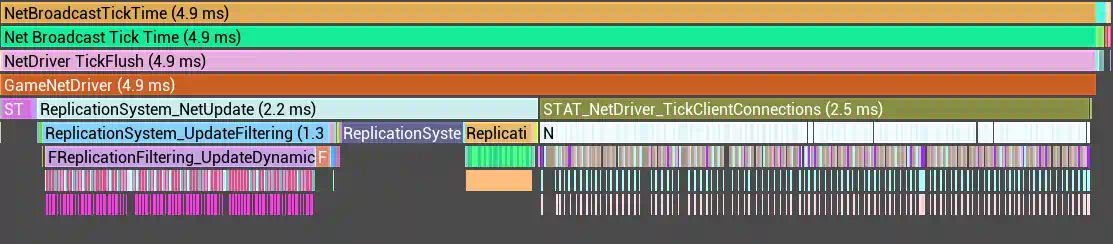
From the charts, it’s clear that simply increasing the preallocated buffer sizes caused FPS to drop from 50+ down to around 33 — and this is with the exact same scene.
At first, I thought it might be a mistake, similar to what happened in the 100 Players in One Place.
1 << 16)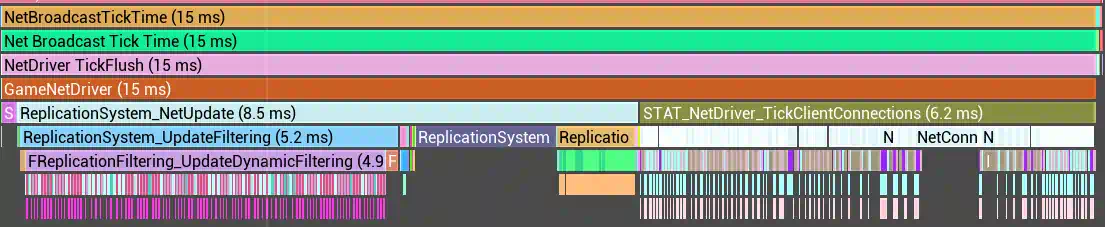
1 << 18)Looking at the profiler data, you can see that the slowdown is spread evenly across multiple categories — this is an Iris-specific behavior worth keeping in mind. You need to monitor the number of replicated objects carefully: MaxReplicatedObjectCount can be large, but once the actual number of objects exceeds the size of the current buffers, Iris expands them by NetObjectListGrowCount, consuming both RAM and CPU.
These buffers do not shrink afterward, even if the total number of replicated objects goes down — for example, when players remove items or dropped trash disappears from the map.
Because of this, the smaller your reasonable MaxReplicatedObjectCount value is, the better.
Sub-Object Replication Testing#
I’m using my own InventorySystem plugin, where each item is represented as a separate UObject, and UInventoryComponent stores a list of items it owns. Our test world already has 10k+ trees, and I’ll add an InventoryComponent to each tree, putting three apples inside it — that is, three UObject instances per tree.
Let’s roughly estimate the number of replicated objects. Each of the 10201 trees has one UHealthAttribute, one UAbilitySystemComponent, one UInventoryComponent, and three UAppleItem. In total, that gives us:
10201 (ATree) + 10201 (UHealthAttribute) + 10201 (UAbilitySystemComponent) + 10201 (UInventoryComponent) + 30603 (UAppleItem) = 71407 replicated objects.
On top of that, we have 100 players, each also with a UInventoryComponent and three UAppleItem.
To visually confirm that the objects are actually being replicated, I modify the scale of each tree: by default, they have a Z scale of 0.5, and once an apple appears in their inventory, the scale changes to 1. Since the replication radius is 150 meters, trees outside this radius remain short, while those inside appear taller.
In this test, we are only interested in the impact of a large number of replicated entities on performance. No additional data — such as apple freshness or stack size — will be changing. We’re measuring purely static overhead.
Since 71407 exceeds the default pool size of 65536, we have to increase the pool. However, because increasing the pool already introduces extra CPU cost, our baseline measurement (without UInventoryComponent and UAppleItem on trees and players) still uses the expanded, preallocated buffers. This is fine — the goal is to compare the effect of different replicated object counts.
OutConfig.MaxReplicatedObjectCount = 1 << 17; // 131072
OutConfig.InitialNetObjectListCount = OutConfig.MaxReplicatedObjectCount;
OutConfig.PreAllocatedMemoryBuffersObjectCount = OutConfig.MaxReplicatedObjectCount;
As you can see, the additional 40,000+ unchanged objects did not directly impact performance — thanks to PushModel.
However, there was still an indirect cost, since we had to increase the buffer size.
Conclusions#
You should keep the number of replicated objects under control. Once the buffers grow, they introduce a permanent performance penalty. From what I understand, the configuration can be split between client and server, since the client usually knows about far fewer replicated objects.
During my experiments, I increased the size of the preallocated buffers up to 2 million, which resulted in about 40 FPS in the editor — on an empty map with only a single character and controller being replicated.
As a final test, I tried increasing MaxReplicatedObjectCount alone, hoping that NetObjectListGrowCount would “handle the rest,” since we were exceeding the limit by only ~20,000 objects.